Appearance
Tutorial: Explosion
In this tutorial, we will create a simple 8-bit explosion effect.
Creating SFXAsset
First of all, please create new SFXAsset named "Explosion", as you did in previous tutorials.
Choosing proper waveform type
For explosions, it is best to use noise waveforms. In this case, we will use White Noise waveform.

As you can hear, it sounds quite harsh and is good starting point for explosion sound.
Shaping the envelope
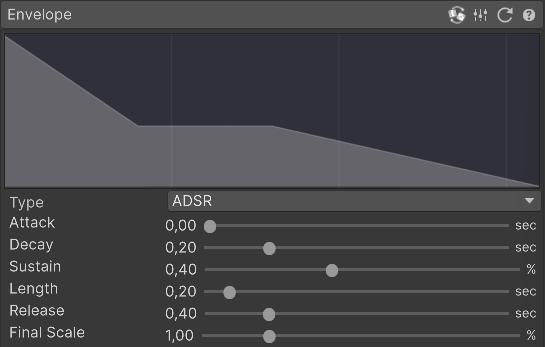
For explosions, the most important part is shaping the envelope properly. Explosions use small or zero attack times with a quick decay and longer release. We also tune the sutain level lower to make accent the initial bang part of the explosion.
Please shape the envelope with the following values:
- Attack: 0.00
- Decay: 0.20
- Sustain: 0.40
- Length: 0.20
- Release: 0.40
Applying proper frequency
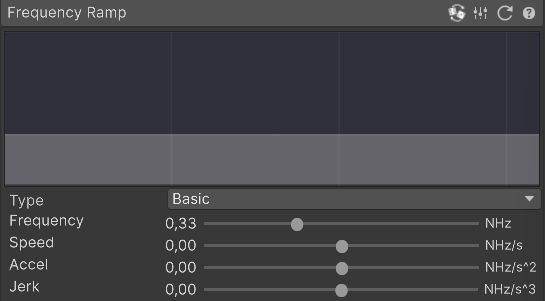
In order to make it sound more like explosion, we need to lower the frequency of the sound. Please change the frequency to 0.33.
Applying Vibrato
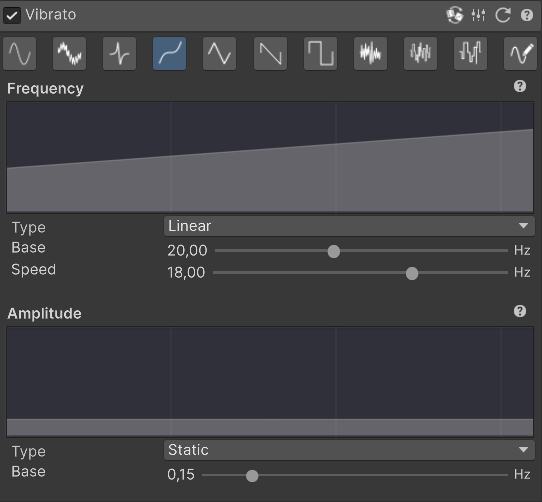
In order to make the explosion sound more "random" and chaotic, we will apply Vibrato effect. However, we do not want explosion to rely on this effect, so we will use it in very subtle way.
Please enable Vibrato and use these settings:
- Wave type: Cubic Wave (this one sounds smoother than Sine Wave)
- Frequency: Linear, Base = 20.00 , Speed = 18.00 (this makes vibrato to move faster over time)
- Amplitude: 0.15 (this makes vibrato effect very subtle)
Applying Skip
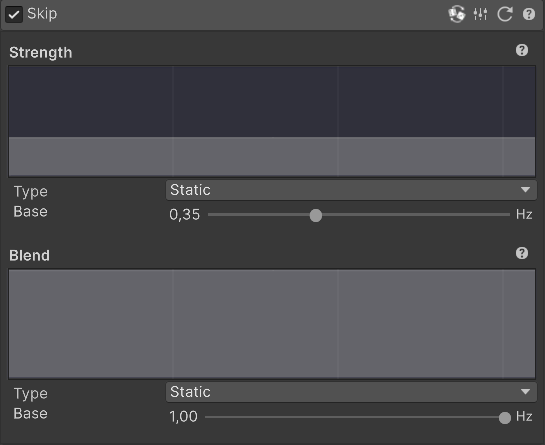
In order make the sound more interesting, we will apply Skip effect. Skip effect decreases the sample rate of the sound, making it sound more "choppy" and lo-fi.
We will use static value of 0.35 for this effect.
INFO
Due to how Skip effect works, it may change the "note" of sound even with very small tunes. A 0.36 value may sound significantly different than 0.35, you can use this to experiment with different feelings of the sound.
Finalizing with Equalizer
Just to make the sound a little more rough, we will decrease mid frequencies a little with Equalizer.
Please change the Mid Gain parameter to 0.70.

That's it!
Congratulations, you have created a simple explosion sound effect!