Appearance
Tutorial: Energy shield
In this tutorial, we will make a retro-style energy shield sound effect.
First, please create new SFXAsset named "EnergyShield", as you did in previous tutorials.
Choosing proper waveform type
For the energy shield sound, we don't want a tonal sound, but rather a noisy one. Therefore, we will set the Wave type to Pink Noise.

It doesn't sound like energy shield yet, more like a wind blowing, but noise waves are good starting point for chaotic sounds. We will make it sound more electric later now!
Applying vibrato
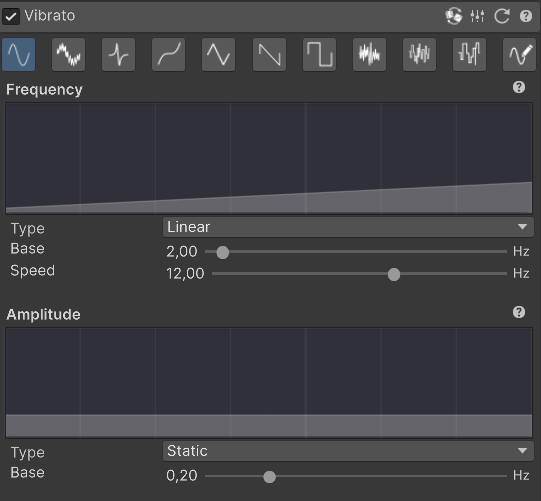
Now, we will apply a wobbling effect to the whole sound, using Vibrato effect. Vibrato effect quickly changes the pitch of the sound up and down, creating that "wobbling" effect we want.
Please enable Vibrato module and set the Amplitude to 0.20 to make it less intense than default.
As for the Frequency, we would like it to start slow, but speed up over time. In order to do so, please set the Frequency type to Linear and set the Base Frequency to 2.00 and Speed to 12.00.
This will start the vibrato at 2 Hz and increase it to 14 Hz over the duration of the sound.
The settings should look like this:
Applying Wave Fusion
Now, in order to make the effect sound like an energetic shield, we will use crazy Wave Fusion effect. Wave Fusion effect allows us to combine two different waveforms together using one of several blending methods.
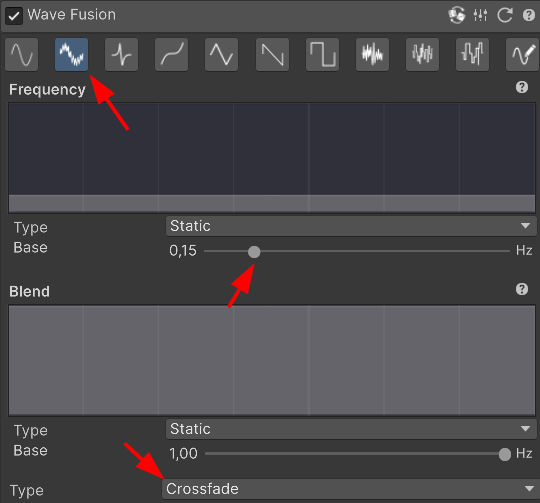
Please enable Wave Fusion module and set the Fusion Wave type to Whistle Wave. For now, you will hear that our previous sound was combined with a bell sound produced by Whistle Wave.
Now, please change the Frequency of the fusion wave to 0.15. This will make it sound like slightly like an energy generator. By default Wave Fusion blends two waves equally, but Crossfade works much better for our needs. Therefore, please change the Fusion Mode to Crossfade.
The settings should look like this:
Applying compression
Finally, we compress the sound a little bit to make it sound more "energetic" using Compression dial in Mastering module. Compression reduces the dynamic range of the sound, making quieter parts louder and louder parts quieter. Higher compression values result in a more "squashed" sound.
Please set the Compression parameter inside Mastering module to 0.40.

Shaping the envelope
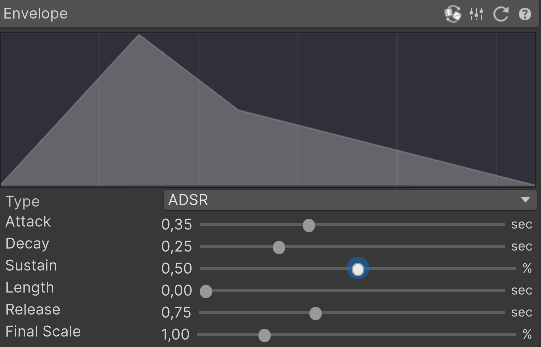
Okay, our sound "texture" is just as we want it. Now we shape the sound envelope to make it sound like an energy shield activating. We will introduce long attack time to make the shield to feel like it is powering up.
Please set the following values in the Envelope section:
- Attack: 0.35
- Decay: 0.25
- Sustain: 0.50
- Length: 0.00
- Release: 0.75
Thats it!
Thats it! You can use this sound for activating energy shield, magical portal or invisibility effect in your game!