Appearance
Envelope
Envelope module allows you to shape the amplitude (volume) of the sound over time. It is essential for defining how a sound starts, sustains, and ends. Without proper envelope, your sound will feel flat and lifeless. In real world, most sounds have a distinct attack, decay, sustain, and release phases.
See: Sound Theory - Envelopes for more information about envelopes.
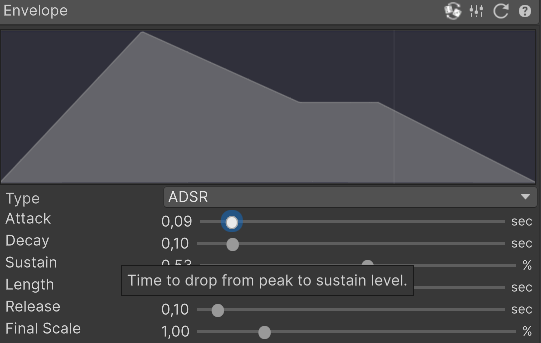
Parameters
- Type: Type of envelope. Choose between ADSR and Custom Curve. With Custom Curve, you can shape your envelope using Unity Curve Editor.
- Attack: Time taken for the sound to reach its maximum amplitude from silence.
- Decay: Time taken for the sound to decrease from maximum amplitude to the sustain level.
- Sustain: The amplitude level during the main sequence of the sound's duration.
- Length: Duration for which the sound remains at the sustain level.
- Release: Time taken for the sound to decrease from the sustain level to silence.
- Final Scale: Overall time scaling factor for the envelope. Higher values will stretch the envelope, making the sound longer. You can use this to fine tune duration of the sound without altering the envelope shape.
Example usage
Use the module to shape the amplitude of the sound over time:
- Use short attack and release times for percussive sounds like blips, hits, explosions and impacts.
- Use longer attack and release times for ambient sounds like wind, pads, rockets and drones.
- Low sustain levels can create "starting" immersion like a starting rocket or engine.
- Zero attack time makes very "explosive" sounds, while longer attack times create "swelling" sounds.
- By using Attack=0.5, Decay=0.5 and rest parameters to zero, you can create a sound that ramps and falls at the same rate, useful for pushing, levels, etc.
INFO
Experiment with different envelope settings to find the perfect shape for your sound. The envelope greatly influences the character and feel of the sound effect.