Appearance
General
Simple waveforms and envelopes are building blocks of sound effects. But to create more interesting and complex sounds, SFXCreator provides various modules that can be applied to the base sound.
If you are familiar with audio synthesis concepts, you can think of SFXCreator modules as audio effects and sound generators that modify the base waveform and envelope to create more complex sounds. Also, the names of modules and their parameters are similar to those used in audio synthesis software.
Enabling modules
Some modules are always active, while others need to be enabled before they can affect the sound. To enable a module, simply check the checkbox next to its name in the SFXAsset Inspector. Once enabled, you can adjust the module's parameters to shape the sound as desired.
Working with values
Many modules allow you to set various parameters. For example, Vibrato module has a parameter for Frequency, which determines how fast the pitch oscillates.
Default setting for Vibrato's Frequency looks like this: 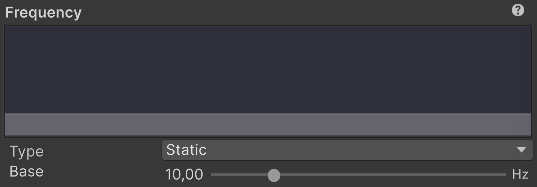
It means that Vibrato will oscillate at 10hz. As you can see, the Type dropdown is set to Static. This means that the value of Frequency will remain constant throughout the sound. If you want to change the value over time, you can select different type from the dropdown.
Above the value, you can see a small graph that represents how the value will change over time.
Here are available types and their parameters:
Static
Static type means that the value will remain constant throughout the sound.
- Base: The constant value of the parameter.
Linear
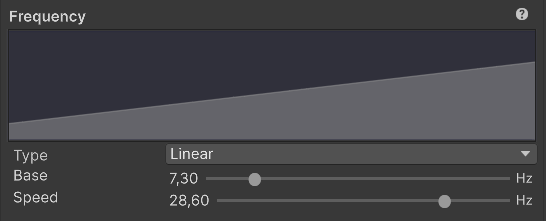
Linear type means that the value will change linearly from a starting value. The change can be positive (ramping up) or negative (ramping down).
- Base: The starting value of the parameter.
- Speed: The delta change across the whole sound duration. Positive values will increase the parameter, negative values will decrease it.
Ping Pong
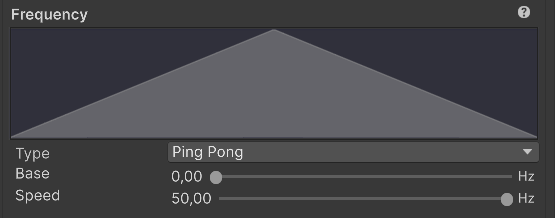
Ping Pong type means that the value will oscillate between two values in a linear fashion.
- Base: The base value of parameter.
- Speed: The delta change.
Step
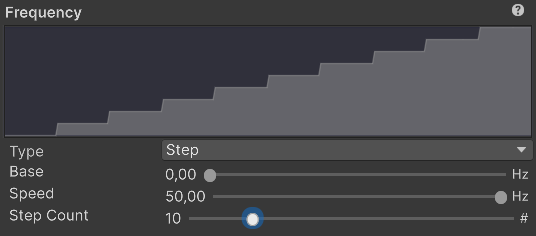
Step is similar to Linear, but instead of smooth change, the value will change in discrete steps.
- Base: The starting value of the parameter.
- Speed: The delta change.
- Step Count: Number of steps to divide the change into.
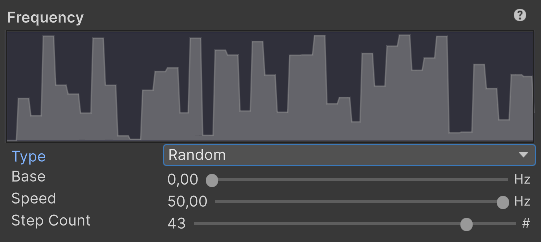
Random
Random type means that the value will change randomly over time.
- Base: The base value of the parameter.
- Speed: The maximum delta change.
- Step Count: Number of random steps to generate.
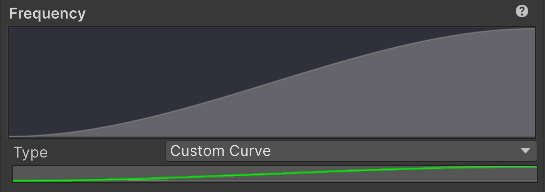
Custom Curve
Allows you to use Unity Animation Curve to define how the value changes over time.
INFO
When using Custom Curve, please keep the values between 0 and 1. They will automatically be mapped to proper ranges for each parameter.
Modules list
SFXCreator provides the following modules:
- Wave
- Frequency Ramp
- Envelope
- Vibrato
- Tremolo
- Bloompirato
- Wave Fusion
- Ring Modulator
- Harmony
- FM Synth
- Arpeggio
- Wah Wah
- Bit Crush
- Skip
- Flanger
- Delay
- Equalizer
- Mastering
Each module is documented in its own page, describing its purpose, parameters, and how to use it effectively. You can navigate to each module's documentation by clicking on the links above.